 |
Sci-SDK Library
SDK for Sci-Compiler projects
|
|
Sci-SDK Library
SDK for Sci-Compiler projects
|
The SciSDK board emulator: a complete Sci-Compiler board, in software.
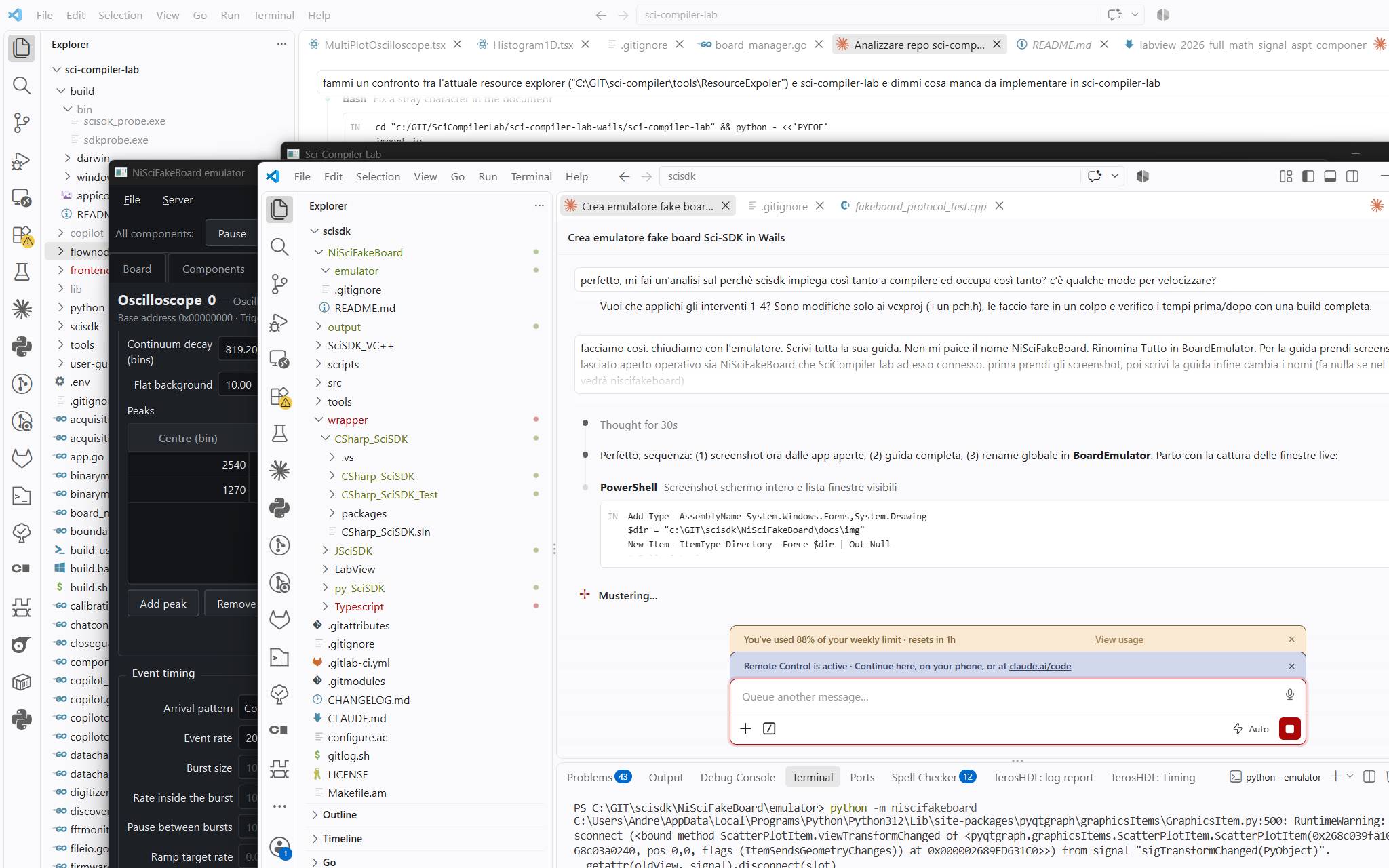
Note on the screenshots. The product was previously called NiSciFakeBoard and the screenshots in this guide still show that name in title bars, device trees and paths. Everything is now called BoardEmulator; read the old name as the new one. The model string
NiSciFakeBoardis still accepted by SciSDK as an alias ofBoardEmulator, so existing code keeps working.
BoardEmulator is a software emulator of a Sci-Compiler board. It listens on a TCP port and speaks the same wire protocol that the SciSDK HAL uses for a real Ethernet board, so SciSDK connects to it exactly as it connects to hardware: same AddNewDevice(), same RegisterFile.json, same component paths, same parameters, same buffers. Nothing in your application changes — only the connection string.
READY port=NNNN line and exits 0 on a clean shutdown — everything a CI job needs to start a "board", run the test suite against it and tear it down.The opening screenshot shows the typical working setup: the emulator on the left with a component panel open, and Sci-Compiler Lab on the right connected to it over 127.0.0.1:8888, plotting the data the emulator is generating.
| Area | Covered |
|---|---|
| Component types | Spectrum, TofSpectrum, Histogram2D, Oscilloscope, OscilloscopeDual, WaveDump/Digitizer, FFTMonitor, ListModule, CustomPacket, FrameTransfer, LogicAnalyzer, MCRatemeter, RegisterFile / MultichannelRegister, CitirocCfg, CitirocFrame, PetirocFrame, plus a generic fallback for future types |
| Board | Name, model, listening port, N analog channels, per-channel AFE (gain, offset, shaper, input impedance, divider) mapped onto the internal register space |
| Registers | Sparse register file, live table, Python on_read / on_write hooks |
| Data | Analytic distributions, 58 measured spectra, detector pulse emulator, full function generator, file playback, packet field generator, user Python providers |
| Control | Per-component and global pause / step / step N / run for; programmable event timing |
Three ways, and which one you want depends on whether you intend to change it.
a) With the SciSDK installer (Windows) — nothing else to install. The setup ships the emulator as a component, frozen: Python, Qt and all. It lands in C:\OpenHardware\SciSDK\BoardEmulator\ and the Start Menu gets a BoardEmulator entry. Two executables in that folder, and the difference matters:
BoardEmulator.exe | the GUI. No console window behind it |
boardemulator-cli.exe | the same program with a console, for --headless |
Use the second one from scripts: headless mode announces itself with a line on standard output (READY port=NNNN) that a launcher waits for, and a windowed program has no standard output to write it to.
b) From the package — the way to script it, and what CI uses. Python ≥ 3.10; the core needs only numpy, the GUI adds PySide6 and pyqtgraph:
Without the [gui] extra you get a headless-only installation (numpy only) — that is what you want in CI.
c) From the sources — the way to change it.
Building the frozen executables yourself:
pip install pyinstallerand thenpython -m PyInstaller --noconfirm packaging/boardemulator.specfromBoardEmulator/emulator.packaging/smoke-test.py dist/BoardEmulatorthen starts the result and talks to it over the wire — an executable that exists is not the same as an executable that works.
The server starts listening on port 8888 as soon as the window opens (the status bar shows Server: listening · Port: 8888 · Clients: 0).
stdout contains exactly one machine-readable line:
An oscilloscope, verbatim from the end-to-end test:
Registers behave exactly as on a board — note the two different namespaces:
BoardEmulator is one of the boards that can serve its own firmware description ("registerfile_json": "from_device" in the board catalog). Pass an empty JSON path and SciSDK downloads the description from the emulator:
This is the fastest way to work: load any RegisterFile.json into the emulator, and every client connects with an empty path and always gets the current description. If a local path is given it always wins over the copy stored in the board. The JSON actually in use can be read back at any time with GetFirmwareJSON (see §10).
: and an explicit port is ignored; for BoardEmulator IP:port is honoured, so "127.0.0.1:9100" works if you started the emulator with --port 9100. If 8888 is already taken (a real board driver, another emulator instance, a leftover process), the server cannot start — pick another port.Windows System32 shadowing. A system-wide SciSDK installation copies SciSDK_DLL.dll into C:\Windows\System32, which the loader searches before PATH. Putting your build folder in PATH is not enough: the installed (possibly old) driver wins, does not know the emulator model and silently falls back to the legacy FAKEBOARD stub — every read then returns uninitialised memory. Load your DLL by absolute path first so that a later plain-name load binds to the module already in memory:
The window has a fixed toolbar at the top (global debug controls, see §6), a row of tabs, and a status bar showing server state, port, number of connected clients and the total event rate being generated.
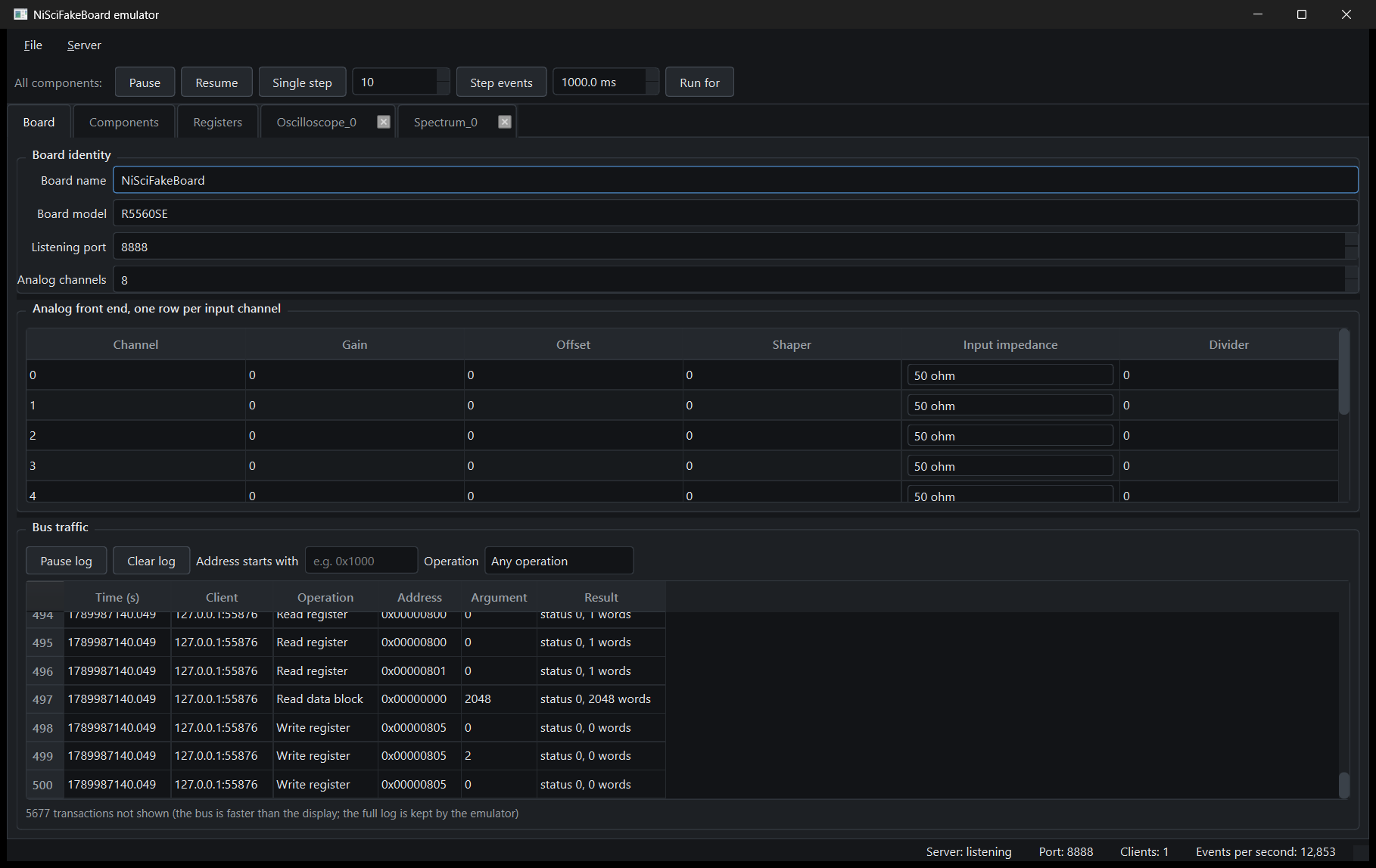
R5560SE, which selects the internal register map being emulated), listening port and number of analog channels.status 0, 2048 words). Pause log and Clear log plus filters by address prefix and by operation. The bus is much faster than any table widget, so the footer tells you how many transactions were not displayed (5677 transactions not shown ...) — the emulator keeps the full log internally.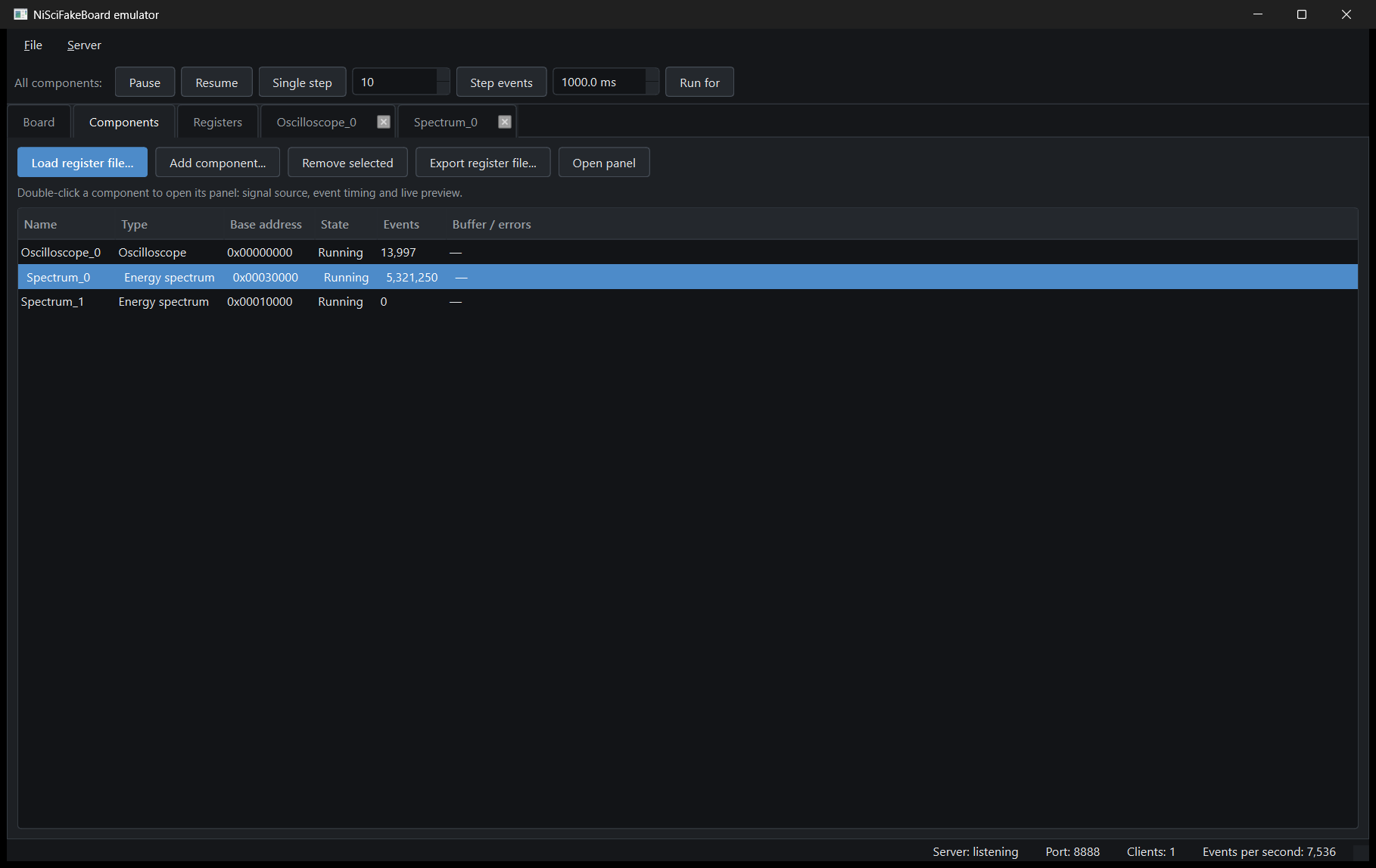
This is the board's content: one row per memory-mapped component with Name, Type (human readable: Energy spectrum, Oscilloscope, ...), Base address, State, Events generated so far and Buffer / errors.
| Button | What it does |
|---|---|
| Load register file... | Load the RegisterFile.json of any board. Every component is instantiated with a sensible default preset and starts producing immediately |
| Add component... | Build a board from scratch, one component at a time (type, name, base address, geometry) |
| Remove selected | Drop a component |
| Export register file... | Write out the current board as a RegisterFile.json — this is the file your application will use |
| Open panel | Open the component's own tab (double-clicking the row does the same) |
Loading a register file is the normal starting point: take the JSON your Sci-Compiler project generated, load it, and you have a working board in a second.
The File menu has Save settings... / Load settings... for the full session JSON (everything, seeds included); the Server menu starts and stops the TCP server.
Each open component gets its own tab. All panels share the same layout:
Name — Readable type, base address and a one-line explanation of what the component does, with the run state on the right.Built-in generator or Custom Python provider; then the list of presets available for this component type, and the form for the selected preset (every parameter with its unit, range and tooltip with the formula). Apply source commits the change; the status line at the bottom left confirms it.Spectrum panel
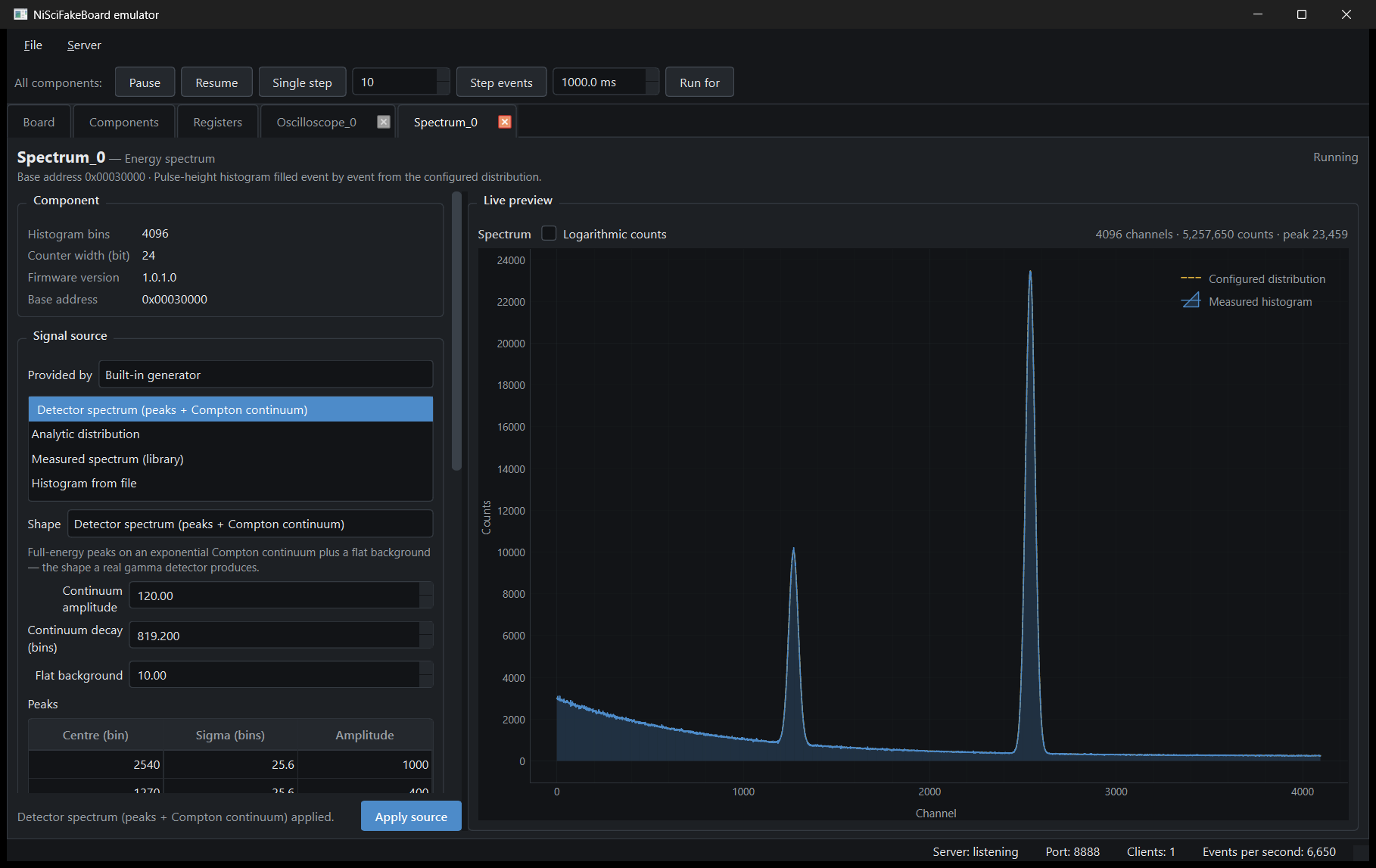
The preview overlays the Configured distribution (dashed) and the Measured histogram (filled) so you can see the histogram converge onto the requested shape event by event — here 4096 channels, 5,257,650 counts, peak 23,459, with the two full-energy peaks sitting on the exponential Compton continuum. A Logarithmic counts checkbox switches the Y axis.
Oscilloscope panel
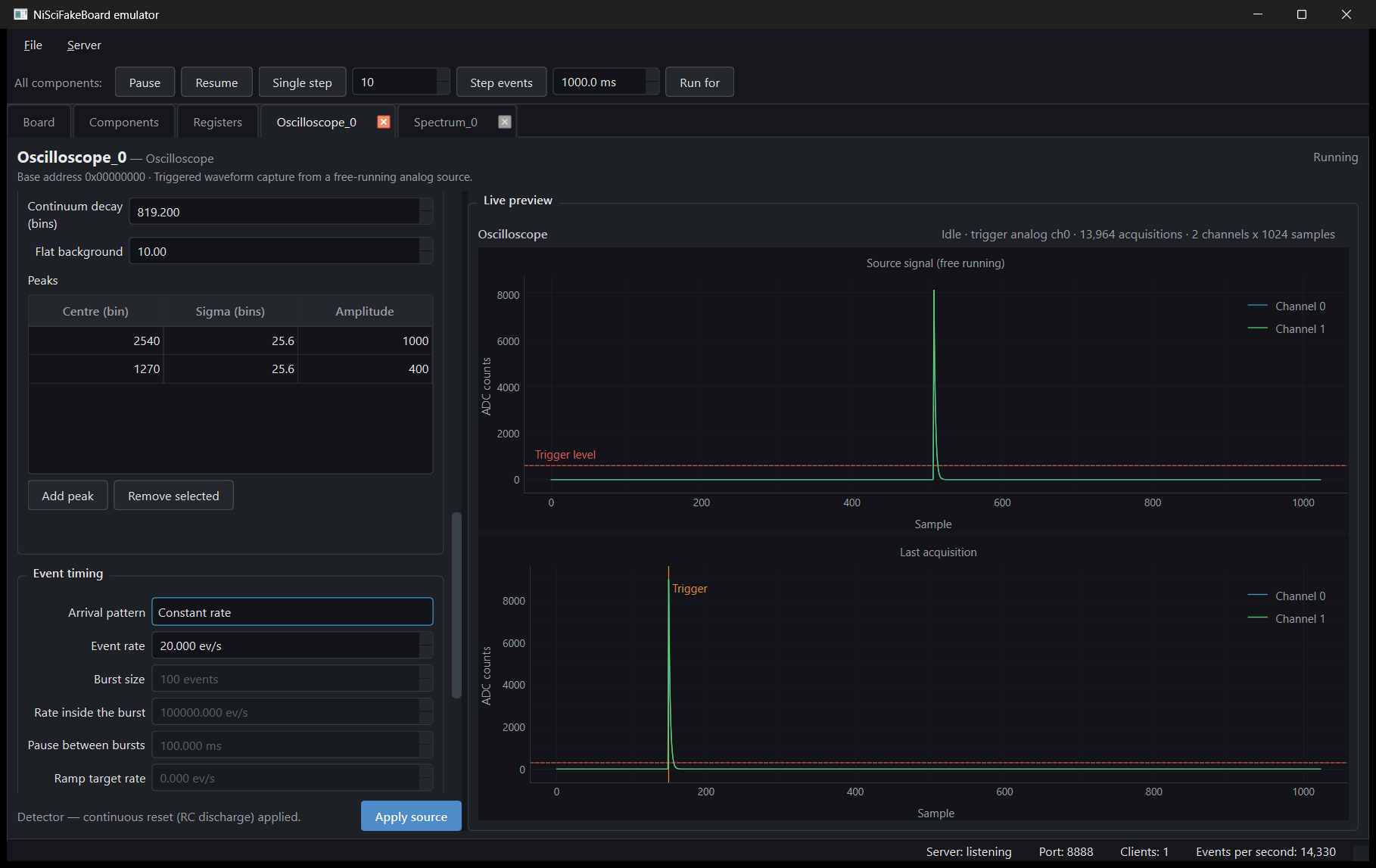
Two stacked plots: Source signal (free running) — the continuous stream the detector emulator produces, with the trigger level drawn as a dashed line — and Last acquisition — the frame the trigger actually captured, with the trigger position marked. The header line summarises the state: Idle · trigger analog ch0 · 13,964 acquisitions · 2 channels x 1024 samples. This is the fastest way to understand why a client is not triggering: if the dashed level sits above every pulse in the top plot, the bottom plot stays empty.
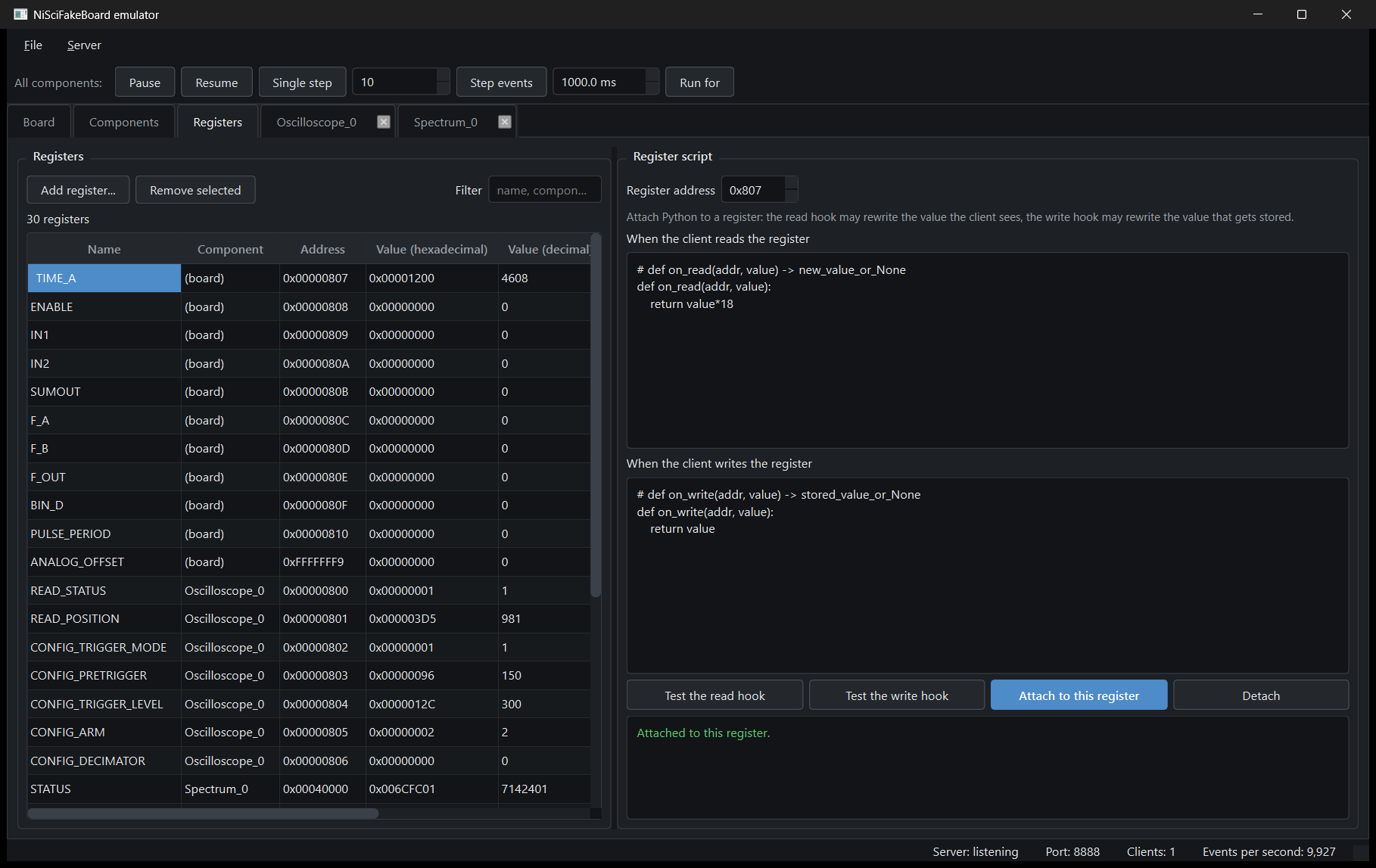
(board) for the board-level ones), Address, value in hexadecimal and in decimal. Values update live as clients read and write them, so you can watch a SciSDK session drive the board. Add register... / Remove selected and a free-text filter on name or component. The grouping by component makes a 30-register board readable at a glance: READ_STATUS, READ_POSITION, CONFIG_TRIGGER_MODE, CONFIG_PRETRIGGER, CONFIG_TRIGGER_LEVEL, CONFIG_ARM, CONFIG_DECIMATOR for Oscilloscope_0, STATUS for Spectrum_0, and so on.The two hooks are plain functions:
Returning None keeps the default behaviour. Inside a hook you also have:
| Name | Meaning |
|---|---|
regs[addr] | read / write the register file directly (no hook recursion) |
internal[wire] | read / write the internal (board / AFE) register space |
addr, value | the address and value of the current transaction |
log(...) | append a line to the emulator log |
Type the code, press Test the read hook / Test the write hook to run it once without side effects, then Attach to this register (Attached to this register. in green) or Detach. Scripts run on a worker thread with a wall-clock timeout and fully isolated errors: a broken script logs and is skipped, it never takes the server down.
A useful, working example — make a status register count the reads and mirror a configuration register:
Every component has a replaceable data source. The presets offered depend on the component type; all of them are sampled event by event, never filled with a static array.
| Preset | What you get |
|---|---|
| Detector spectrum (peaks + Compton continuum) | Full-energy peaks on an exponential Compton continuum plus a flat background — what a real gamma detector produces. Parameters: Continuum amplitude (default 120), Continuum decay (bins) (bins/5), Flat background (10) and a table of peaks (Centre (bin), Sigma (bins), Amplitude); defaults are two peaks at 0.62 and 0.31 of the range with sigma = bins/160 and amplitudes 1000 / 400 |
| Analytic distribution | A closed-form probability density sampled through its quantised CDF |
| Measured spectrum (library) | One of the 58 real measured spectra shipped with the emulator, resampled onto this component's bins |
| Histogram from file | A histogram read from CSV or binary, used as the sampling distribution |
The analytic shapes, with their parameters (labels as shown in the GUI):
| Group | Shapes |
|---|---|
| Continuous | Gaussian, Uniform (flat), Exponential decay, Log-normal, Gamma, Beta, Weibull, Rayleigh, Maxwell-Boltzmann, Chi-squared, Student's t, Cauchy / Lorentzian, Laplace (double exponential), Triangular |
| Physics | Landau, Detector spectrum (peaks + Compton continuum) |
| Discrete | Poisson, Binomial, Geometric |
The measured-spectrum library covers the isotopes and samples you would actually calibrate with — Cs-137, Co-60, Co-57, Na-22, Am-241, Ba-133, Eu-152, K-40, Ra-226, Lu-176, I-131, Tc-99m, Ac-225, Pb-210, ... — plus real-world samples (KCl, Fiestaware, RadiumDial, Pitchblende, Uranium-glaze, Sabbia_Tenerife, grass_chernobil, He3_tube_neutron_spectrum, HPGe backgrounds). Pick one and the emulator samples that spectrum as a distribution: shapes, peak ratios and continuum are those of a real measurement.
Sampling pipeline (identical for Histogram2D): source histogram → area-preserving linear resample onto the component's bins → CDF quantised to 32 bit → inverse-transform sampling with a seeded RNG. Same seed, same sequence of events.
| Preset | What you get |
|---|---|
| Detector — continuous reset (RC discharge) | Charge-sensitive preamplifier with a discharging feedback resistor: each event is a pulse that decays back to the baseline |
| Detector — transistor reset (ramp + reset) | Charge integrator without feedback resistor: the baseline climbs one step per event until a reset discharges it |
| Function generator | Deterministic laboratory waveform (sine, square, chirp, noise, ...) |
| Waveform from file | Replay samples recorded in a CSV or binary file, in loop |
The physics, briefly. A radiation detector delivers a packet of charge per event. In a continuous reset (resistive feedback) preamplifier, that charge is integrated on the feedback capacitor and then bled away through the feedback resistor: you see a pulse with a fast rise (tau_rise, tens of ns) and an exponential fall (tau_fall, µs), returning to baseline. Overlapping tails are pile-up, and they simply add — exactly as in the emulator. In a transistor reset (pulsed reset) preamplifier there is no feedback resistor, because a resistor adds thermal noise; the charge accumulates and the output is a staircase that climbs one step per event, each step proportional to the event energy. When the output approaches saturation a transistor shorts the capacitor and the baseline is dumped back to zero in a short ramp (or exponential), during which the channel is blind. Best noise performance, at the cost of a duty cycle. Both are reproduced, with the reset triggered when the baseline crosses the threshold, at a fixed period, or whichever comes first, and with a linear ramp or exponential discharge recovery shape.
Detector parameters (core names, GUI labels in brackets where they differ): rate_hz (event rate), sample_rate_hz (sampling frequency), pulse_shape (double_exp = Double exponential (rise + fall), single_exp = Single exponential (step + RC decay), charge_integrator = Charge integrator (staircase + reset)), tau_rise, tau_fall, baseline_offset, afe_gain, afe_offset, and for the charge integrator reset_mode, reset_threshold, reset_period_samples, reset_duration_samples, reset_shape. Amplitudes are drawn from the configured spectrum — the distribution you choose is the amplitude spectrum, so an oscilloscope and a spectrum on the same board can be made physically consistent.
The function generator covers, per group:
| Group | Waveforms |
|---|---|
| Periodic | Sine, Cosine, Square (duty), Triangle (symmetry), Ramp up / Ramp down, Staircase, Half- and Full-rectified sine, Clock (with edge jitter) |
| Pulses | Trapezoidal pulse (delay / rise / flat top / fall in samples), DC level, Sinc, Gaussian pulse, Lorentzian pulse, Trapezoid (relative timing), Impulse train |
| Detector-like | Single exponential decay, Double exponential pulse, Step with overshoot, Step with undershoot, Ringing, Damped sine, Damped cosine, Step response |
| Noise | White, Gaussian, Pink (1/f), Brown (random walk), Blue, Violet, Uniform (min/max), Exponential, Poisson, Impulse / shot, Quantisation, Flicker (1/f octaves), Popcorn / telegraph |
| Modulated | AM, FM, PM, PWM, FSK, PSK, ASK, QPSK |
| Sweeps | Linear chirp, Exponential chirp, Logarithmic chirp, Morlet wavelet, Mexican hat wavelet |
| Digital | PRBS-7, PRBS-15, PRBS-23, NRZ, RZ, Manchester |
Time base convention: one frame is nsamples samples, so a frequency of 1.0 means one cycle per frame and a time constant of 1.0 means one frame long. Amplitudes are relative: 1.0 is full scale. Additive noise can be layered on any waveform, and the generator is phase-continuous across calls — no discontinuity between one acquisition and the next.
The scale chain is:
full_scale is the size of the signal and offset its baseline; neither clips. The only clamp is the physical ADC range of the channel.
Waveform components (Oscilloscope, OscilloscopeDual, WaveDump) have an ADC coding box. Real boards exist with WordEnob of 16, 20, 24, 28 or 32 bits, and each channel can code its samples independently, so the coding is a per-channel choice:
| Coding | Range |
|---|---|
| Unsigned | 0 .. 2^enob - 1 |
| Signed (two's complement) | -2^(enob-1) .. 2^(enob-1) - 1 |
The clamp range of the generators follows from this choice automatically (signed channels sit around zero, unsigned ones on a positive baseline), and the trigger level is interpreted in the same coding. The digitizer (WaveDump) packs two 16-bit samples per 32-bit word whatever WordSize says, so its coding is always evaluated at 16 bits.
| Preset | What you get |
|---|---|
| Field generator | Each word of the packet is built by a named field generator |
| Packets from file | Replay raw packet words recorded in a CSV (one column per field) or binary (stream of u32 little-endian) file, once or in loop |
Field kinds:
| Kind | Parameters |
|---|---|
| Constant value | value (hex or decimal) |
| Event counter | start, step, wrap |
| Timestamp | counter running at a simulated clock frequency |
| Random (uniform) | min, max |
| Random (Gaussian) | mean, sigma |
| Math expression | expression over n (event index), t (time), ch and the other fields |
| Sampled from a spectrum | samples the distribution generator — e.g. an energy field |
| Packed bit-field | a list of named sub-fields with a width in bits, packed MSB-first into one 32-bit word |
For CustomPacket the packet_size of the RegisterFile is honoured and an optional constant align word is prepended to every packet — the word SciSDK checks when check_align_word is enabled (0xFFFFFFFF in the shipped examples):
| Preset | What you get |
|---|---|
| Correlated blobs (2-D Gaussians) | A few correlated 2-D Gaussian spots — (x0, y0, sigma_x, sigma_y, rho, amplitude) — on a uniform background |
| Two independent distributions (X × Y) | X and Y drawn from two independent 1-D distributions, each configured like a spectrum |
| Histogram from file | CSV row-major, or binary u32 |
One preset, Per-channel rates: a fixed average counting rate per channel, refreshed by the producer with a small random fluctuation, exposed as one u32 per channel exactly as the driver expects.
The timing engine decides how many events are produced in each tick; the data source decides what they look like. It is configured per component, in the Event timing box (GUI) or with the timing command / config JSON.
| Mode (GUI label) | Id | Parameters | Behaviour |
|---|---|---|---|
| Constant rate | constant | Event rate (ev/s) | Fixed 1/rate intervals |
| Poisson (random arrivals) | poisson | Event rate (ev/s) | Exponentially distributed inter-arrival times — realistic radiation counting |
| Burst | burst | Burst size (events), Rate inside the burst (ev/s), Pause between bursts (ms) | A packet of events at the burst rate, then a pause, repeated |
| Burst with rate ramp | burst_ramp | as Burst plus Ramp target rate and ramp shape (Linear / Logarithmic) | Burst whose rate ramps from the burst rate to the target rate |
The same scheme applies to spectra and 2-D histograms (event accumulation rate) and to the detector emulator (pulse rate). One exception: components whose simulated time is measured in samples rather than seconds — the oscilloscope acquisition — bypass the timing engine and are paced by their own sample budget.
From the CLI or a scenario file:
Data generation can be frozen and advanced by hand, per component or globally. The bus stays coherent while paused: status registers keep answering, FIFOs simply stop growing.
| Action | GUI | CLI / scenario | Provider / script API |
|---|---|---|---|
| Pause | Pause | pause [component] | ctx.component("X").pause() |
| Resume | Resume | resume [component] | .resume() |
| One event | Single step | step [component] | .step() |
| N events | value box + Step events | step_n N [component] | .step_n(n) |
| Run for T ms then auto-pause | ms box + Run for | run_for MS [component] | .run_for(ms) |
The toolbar at the top of the window (All components: Pause | Resume | Single step | [10] Step events | [1000.0 ms] Run for) acts on everything at once; each component panel has the same controls for itself. Omitting the component name in a CLI command means "all
components".
Start an emulator with everything frozen and advance it deterministically:
then on stdin:
The debug state is part of the saved configuration, but a fresh start is always running.
When no preset produces what you need — a specific detector, a replayed experiment, a protocol under test — plug in your own Python class. Built-in generators use the very same interface, so a user provider is a first-class citizen.
Subclass the base class matching the component kind:
| Base class | Components | Method to implement |
|---|---|---|
WaveProvider | Oscilloscope, OscilloscopeDual, WaveDump, FFTMonitor | next_n(n) -> np.ndarray[float64] |
SpectrumProvider | Spectrum, TofSpectrum | sample_n(n) -> np.ndarray[int] (event amplitudes) |
Spectrum2DProvider | Histogram2D | sample_n(n) -> (np.ndarray, np.ndarray) |
PacketProvider | ListModule, CustomPacket, FrameTransfer, Citiroc/PetirocFrame | next_events(max_events) -> np.ndarray[uint32] (whole packets) |
Optional hooks on every provider: attach(ctx) (once, keep ctx), detach(), configure(params: dict), reset(), on_register_write(name_or_addr, value), describe().
ProviderContext is the door to the rest of the board:
| Member | Use |
|---|---|
ctx.registers["NAME"] / ctx.registers[addr] | read and write bus-visible registers |
ctx.internal[(addr, idx)] | internal register space (AFE and friends) |
ctx.subscribe_register(name_or_addr) | enable on_register_write for that register |
ctx.me | handle of the component being served (.component, .pause(), .step_n(), ...) |
ctx.component("Name") | handle of another component |
ctx.provider_of("Name") | the provider instance of another component |
ctx.board | board / per-channel AFE state |
ctx.channel | the channel this instance serves (None for single-source components) |
ctx.log(msg) | write to the emulator log |
Two rules worth remembering: the timing engine decides how many events are requested, the provider only decides what they look like; and the emulator never crashes because of a provider — any exception is logged and the component is paused, so check the emulator messages when a component stops unexpectedly.
The shipped template contains three classes; copy the file and edit it.
**RegisterDrivenPeak(SpectrumProvider)** — a Gaussian peak whose position and width are driven by board registers. This is the register ↔ generator interoperability in its simplest form:
Write PEAK_POS from SciSDK (or from the register table in the GUI) and the peak moves in the next events — a perfect target for testing an auto-calibration routine.
**EnergyTaggedEvents(PacketProvider)** — list events whose energy is drawn from another component's provider, via ctx.provider_of("Spectrum_0"), so the list and the spectrum stay physically consistent. It reads the packet width from the component itself (packet_size for CustomPacket, chunk_words for ListModule) and emits n × packet_size words with a timestamp, an energy and a channel id.
**SquareWave(WaveProvider)** — the minimal waveform provider; it also shows how to read the simulated AFE (ctx.board.channel(ch).gain) and how configure(params) maps GUI / config parameters onto attributes.
Providers may also write registers (status words, counters), which is how you emulate a firmware block that reports back to the host.
From the GUI: open the component panel, set Provided by to Custom Python provider, pick the .py file, choose the class from the discovered list, press Apply source. The status line reports Custom provider attached. or the import error. There is also a reload button, so the edit → reload → observe loop needs no restart.
From code or configuration:
Providers are saved in the session JSON (path, class, params, channel) and restored on load, so a CI run can use them too.
Sci-Compiler Lab is a SciSDK client like any other: point it at 127.0.0.1:8888 with model BoardEmulator and it connects, enumerates the firmware and starts plotting. Nothing in Lab knows it is not talking to hardware.
The device tree and the waveform
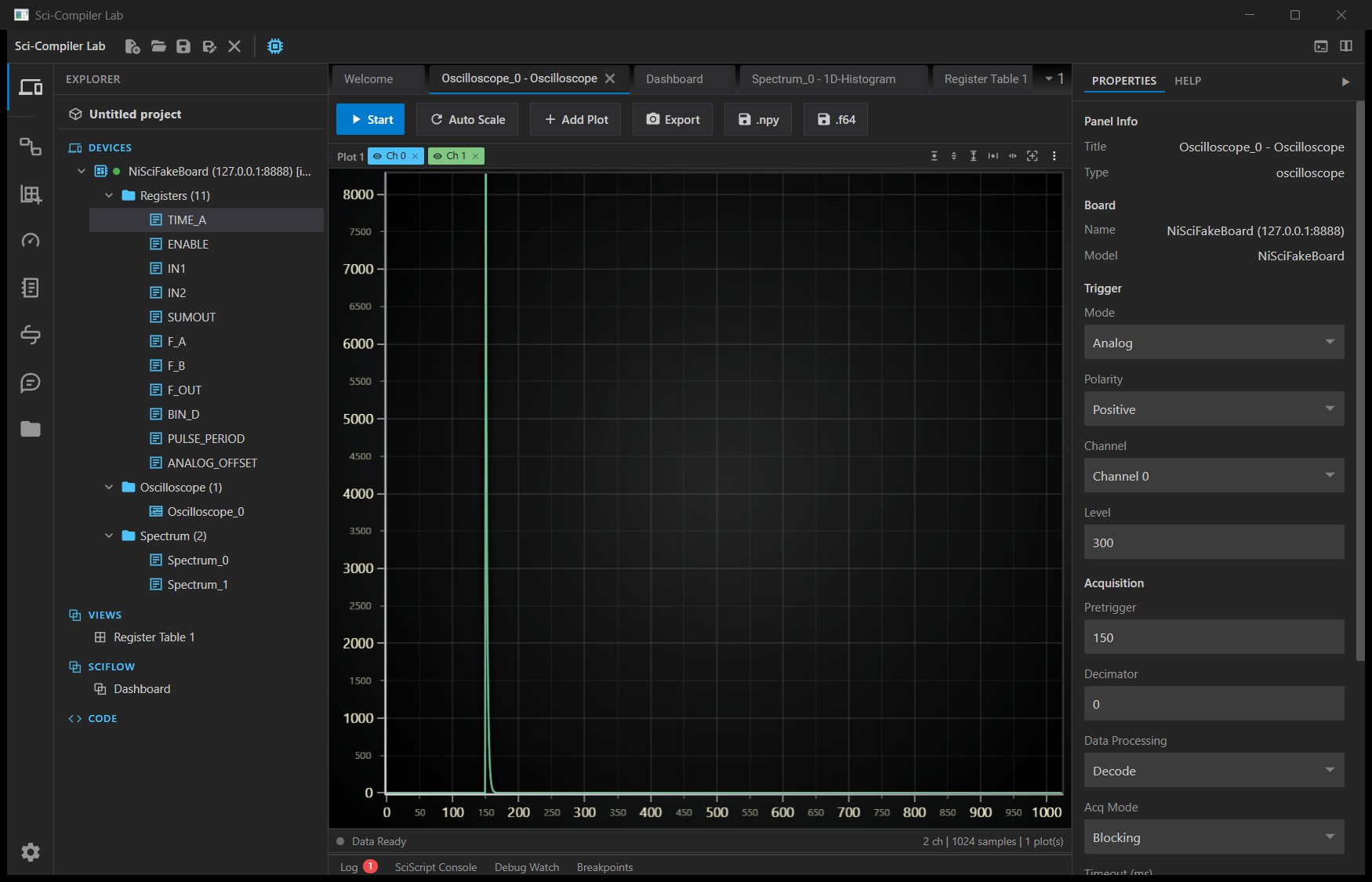
The Explorer shows the connected device — NiSciFakeBoard (127.0.0.1:8888) with a green "connected" dot (it will read BoardEmulator after the rename) — expanded into Registers (11) (TIME_A, ENABLE, IN1, IN2, SUMOUT, F_A, F_B, F_OUT, BIN_D, PULSE_PERIOD, ANALOG_OFFSET), Oscilloscope (1) and Spectrum (2). The oscilloscope panel is running with two channels and 1024 samples per acquisition; the detector pulse is captured right after the 150-sample pretrigger. The Properties pane on the right shows the parameters being pushed to the emulator: Trigger Mode Analog, Polarity Positive, Channel Channel 0, Level 300, Acquisition Pretrigger 150, Decimator 0, Data Processing Decode, Acq Mode Blocking. Those are exactly the parameters of §2.4, driven from a GUI instead of from Python.
The spectrum growing
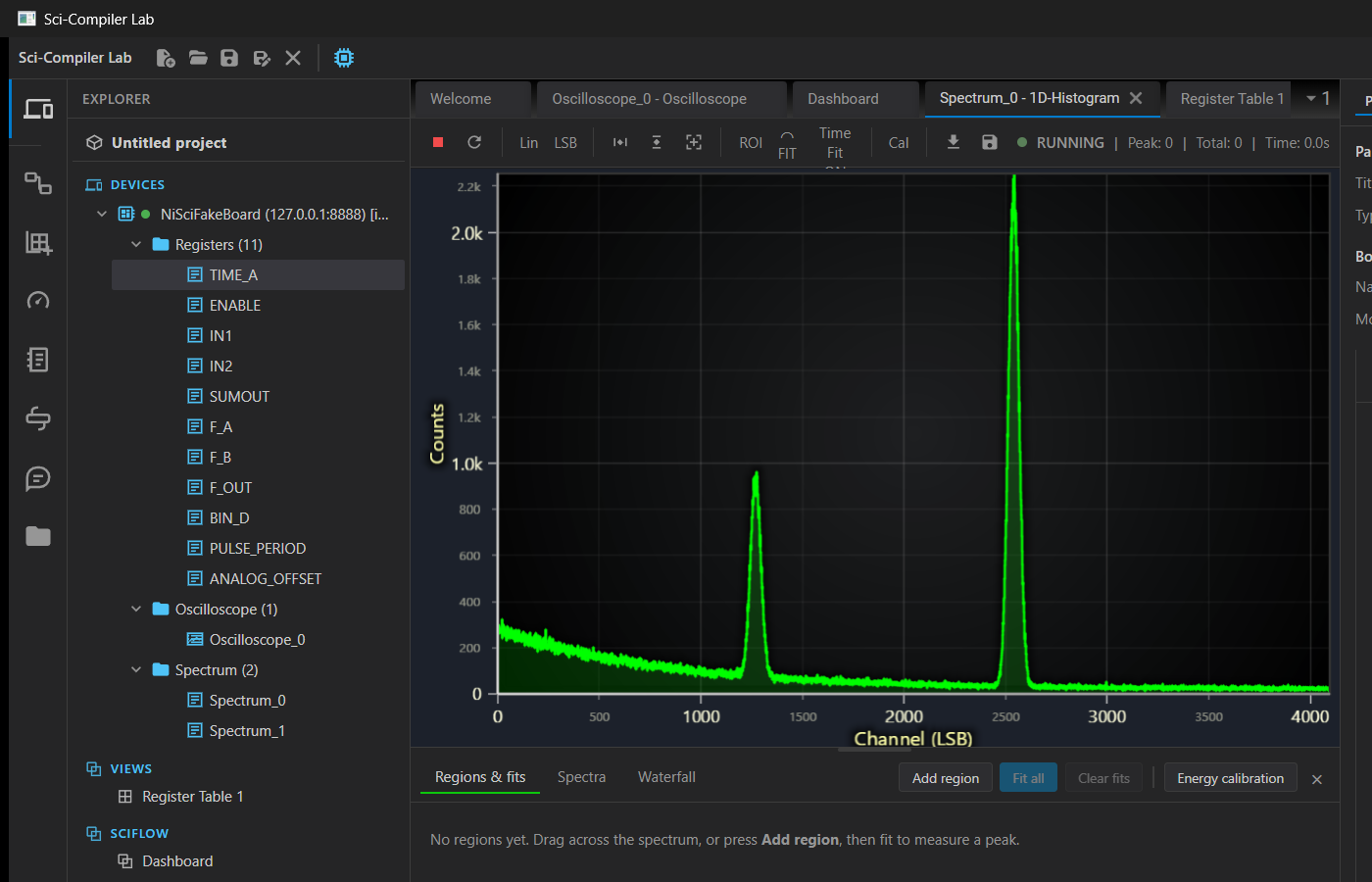
Spectrum_0 displayed as a 1-D histogram, RUNNING, over 4096 channels: the exponential Compton continuum at low channel numbers and the two full-energy peaks at ~1270 and ~2540, matching the peak table configured in the emulator's spectrum panel. The counts climb as you watch. The regions & fits toolbar (Add region, Fit all, Energy calibration) works on this data like on any real measurement, which is exactly what you need to develop a fit or calibration feature without a source and a detector on the bench.
The register table
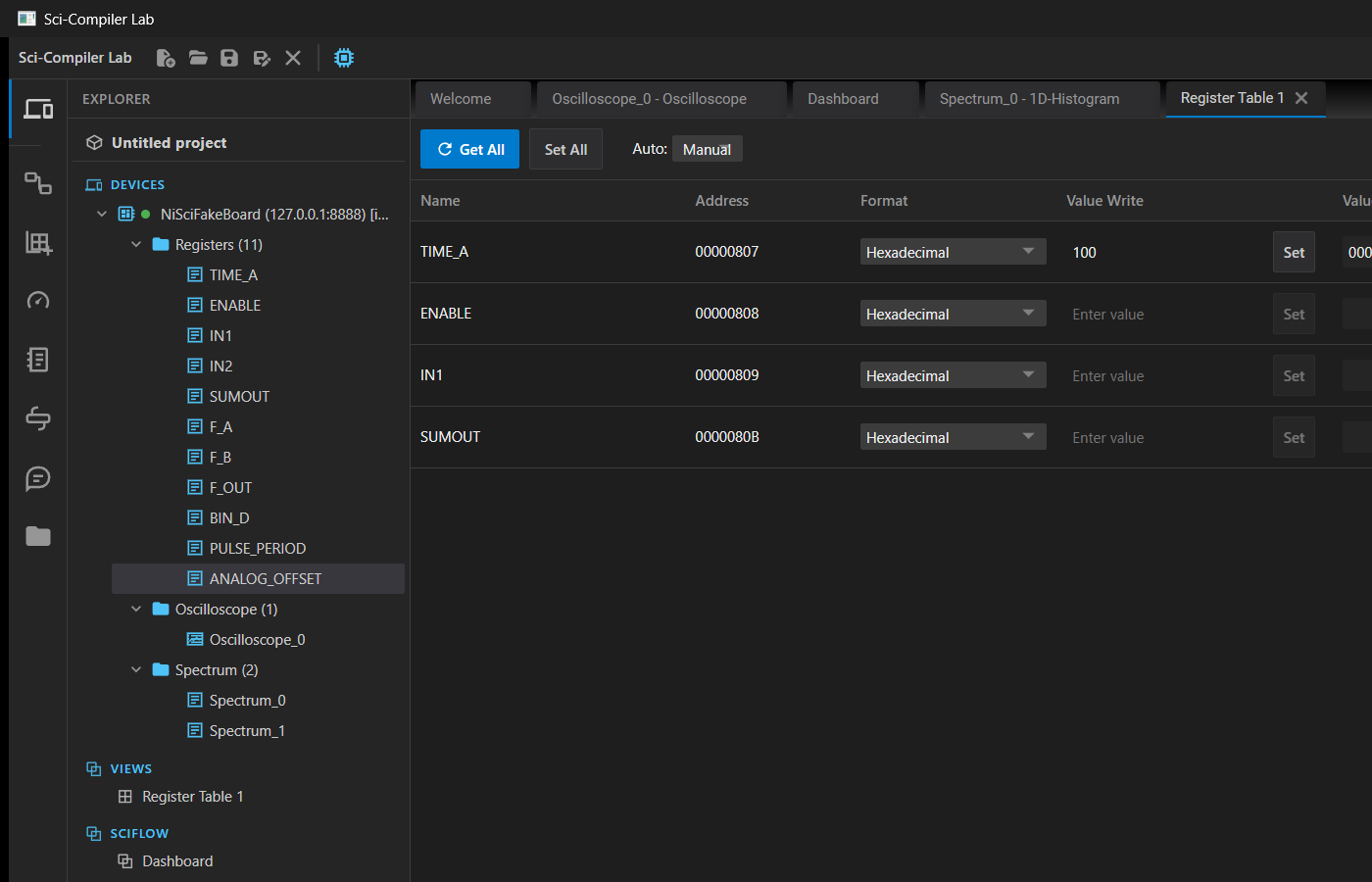
A Register Table view with TIME_A (00000807), ENABLE (00000808), IN1 (00000809), SUMOUT (0000080B), each with a format selector, a Value Write field and Set / Get All / Set All buttons. Writing here produces a Write register row in the emulator's Bus traffic log and updates the emulator's register table instantly — and if you attached an on_write hook, its effect shows up here on the next read.
RegisterFile.json from your Sci-Compiler project (or design the board in the emulator's Components page and export it from there).127.0.0.1:8888 and build the panels, the analysis, the calibration.| Flag | Meaning |
|---|---|
--config FILE | Emulator settings JSON (the full persistent state) |
--headless | Run the TCP server only, no GUI (CI mode) |
--port N | TCP port to listen on (default 8888, or the one from --config) |
--host ADDR | Bind address (default 0.0.0.0) |
--resource FILE | RegisterFile.json to load; overrides the one inside --config |
--duration S | Run for S seconds, then exit cleanly (headless CI runs) |
--seed N | Master seed for the data generators (reproducible runs) |
--save-config FILE | Write the resulting full state to FILE and exit |
--pause-on-start | Start with every component paused (debug mode) |
--commands | Read debug commands from stdin |
--scenario FILE | Run a file of debug commands after startup |
--quiet | Suppress informational messages (they go to stderr) |
--version | Print the version and exit |
Debug commands accepted on stdin and in a scenario file (lines starting with # are comments):
status prints a JSON snapshot (server stats, board, per-component state) on stdout — handy as an assertion source in a test.
READY port=NNNN, flushed as soon as the server is listening. Wait for it; do not sleep.SIGINT, SIGTERM, --duration expiry, or a quit command. Non-zero means the server could not start (1) or the arguments / config were invalid (2).--port 0 the OS picks a free port and READY port=NNNN tells you which — the safest option when several jobs share a runner.The whole state lives in one versioned JSON file, written by the GUI (File → Save settings...) or by --save-config:
Seeds are applied before the presets, so a run is deterministic. Prepare the board interactively, save, commit the JSON, and CI replays it verbatim:
--seed N on the command line overrides the seed for a one-off experiment.
Pseudo-YAML, adapt to your runner:
The emulator's own test suite already contains tests/e2e_scisdk_real.py, which drives the real SciSDK C++ driver against an in-process emulator and skips cleanly when the native library is not available — the reference for how to wire this up in your own repository.
An application does not have to hard-code the list of models or the shape of a connection path; SciSDK can describe itself. Full reference in `docs/discovery.md`.
| Function | Purpose |
|---|---|
SCISDK_GetSupportedBoardList | ;-separated list of accepted model strings (aliases included) |
SCISDK_GetSupportedBoardsInfo | JSON description of every board: transports, path_format, default_port, whether the RegisterFile is required or from_device |
SCISDK_Enumerate | Boards physically connected right now (USB families only; Ethernet boards have no discovery protocol) |
SCISDK_GetFirmwareJSON | The RegisterFile JSON actually in use by a connected device |
Model strings are case-insensitive. In C, every one of these returns a string allocated by SciSDK that must be released with SCISDK_free_string().
SciSDK connects but every read returns garbage (Windows). A system-wide SciSDK installation put SciSDK_DLL.dll in C:\Windows\System32, which the loader searches before PATH. The old driver is loaded, does not know the emulator model, silently falls back to the legacy FAKEBOARD stub backend, and every read returns uninitialised memory. Load your build by absolute path first (ctypes.CDLL(r"...\SciSDK_DLL.dll") in Python, LoadLibrary with a full path in C++), or uninstall the system-wide SDK. SciSDK_DLL_Info.exe, run from your application folder, prints which library would actually be used.
The server does not start / "address already in use". Port 8888 is taken — another emulator instance, a real board driver, or a process that did not exit. Start with --port 9100 (and connect to 127.0.0.1:9100), or --port 0 to let the OS pick and read the port from the READY port=NNNN line.
**ERROR: the graphical interface requires PySide6 and pyqtgraph.** The package was installed without the GUI extra. Either pip install boardemulator[gui] (or pip install -e .[gui] from BoardEmulator/emulator), or run headless: python -m boardemulator --headless. This message is by design — CI installations deliberately have no Qt.
A component appears as "Generic register block". The Type in the RegisterFile is not one the emulator has a dedicated model for (a newer Sci-Compiler component, or a typo). The generic fallback still registers the address range and answers register reads and writes, so the connection and the rest of the board work; it just produces no data stream. Check the spelling of Type, and if the component is genuinely new, the bus semantics need to be added to the emulator (see `BoardEmulator/docs/BUS_CONTRACT.md` and `BoardEmulator/docs/EXTENSIBILITY.md`).
A component stopped producing on its own. A custom provider raised: the emulator logs the exception and pauses the component rather than crashing. Look at the emulator messages (stderr in headless, the log in the GUI), fix the provider, reload it, then Resume.
The connection works but the oscilloscope never triggers. Open the oscilloscope panel and look at the Source signal (free running) plot: if the dashed trigger level is above every pulse, nothing will ever fire. Lower trigger_level, check trigger_channel and trigger_polarity, or use trigger_mode = "self", which is an auto trigger and fires regardless of the level.
Everything feels slow, the GUI stutters. The bus is far faster than any table widget. The transaction log is batched and capped on purpose (the footer tells you how many rows were not displayed); if you are hammering the board, use Pause log or an address filter on the Board page. Emitting one Qt signal per transaction was measured to drag an oscilloscope from ~215 down to ~16 acquisitions per second — which is why the log batches at ~10 Hz. High event rates also cost CPU in the generators: lower the event rate, or run headless when you only need throughput.
Results are not reproducible between runs. Set a seed: --seed 12345, or save a configuration (which stores the seed) and reuse it. Note that wall-clock-paced components depend on machine load; for strict determinism use --pause-on-start with step_n.
The internal technical documents of the emulator live next to its source, in BoardEmulator/docs/: